
---
title: Working with Saved Searches in Sage CRM
description: Saved Searches are a simple but powerful feature of Sage CRM.  Learn more about this time-saving feature in Sage CRM.
image: https://www.equationtech.us/hs-fs/file-14047847-png/images/09-05-2012-crm-save-search-thmb.png
---

[866.436.3530](tel:+8664363530) | [** Customer Portal Login](https://na.myconnectwise.net/support/index.htm?Company=equationtech)

[Speak With an Expert](https://www.equationtech.us/speak-with-an-expert)

[![Equation Technologies - Sage Business Partner | San Diego](https://www.equationtech.us/hs-fs/hubfs/Redesign_Images/logo.png?width=230&name=logo.png "Equation Technologies - Sage Business Partner | San Diego")](https://www.equationtech.us/)

- [Sage Services](https://www.equationtech.us/sage-services) 
    - Products We Support 
          - [Sage 300](https://www.equationtech.us/sage-services/sage-300-cloud)
          - [Sage Intacct](https://www.equationtech.us/sage-services/sage-intacct/)
          - [Sage CRM](https://www.equationtech.us/sage-services/sage-crm)
          - [Sage Payroll](https://www.equationtech.us/sage-services/sage-payroll)
          - [Sage HCM](https://www.equationtech.us/sage-services/sage-hcm-software)
          - [Sage FAS](https://www.equationtech.us/sage-services/fixed-assets)
          - [Sage Intelligence](https://www.equationtech.us/sage-services/sage-intelligence)
          - [Sage Enterprise Intelligence](https://www.equationtech.us/sage-services/sage-enterprise)
    - Services We Offer 
          - [Software Selection](https://www.equationtech.us/software-solution-selection)
          - [Implementation](https://www.equationtech.us/sage-services/erp-implementation)
          - [Customization](https://www.equationtech.us/sage-services/customization)
          - [Support](https://www.equationtech.us/sage-services/support)
          - [Training](https://www.equationtech.us/sage-services/sage-training)
          - [Sage Cloud](https://www.equationtech.us/sage-services/hosting)
          - [Upgrades](https://www.equationtech.us/sage-services/upgrades)
    - [Extend Sage](https://www.equationtech.us/sage-integrations) 
          - [Magento eCommerce](https://www.equationtech.us/sage-integrations#magento)
          - [ADP](https://www.equationtech.us/en/sage-300-sage-intacct-payroll-powered-by-adp)
          - [Aloha POS](https://www.equationtech.us/sage-integrations#aloha)
          - [Salesforce](https://www.equationtech.us/sage-integrations#salesforce)
          - [TimeClockPlus](https://www.equationtech.us/timeclockplus)
          - [Other Solutions](https://www.equationtech.us/other-solutions)
- Industries 
    - [Distribution](https://www.equationtech.us/distribution-management-software-solution)
    - [Education Nonprofit](https://www.equationtech.us/education-nonprofit-accounting-software)
    - [Financial Services](https://www.equationtech.us/financial-services-software)
    - [Franchise](https://www.equationtech.us/franchise-management-software)
    - [Healthcare](https://www.equationtech.us/healthcare-finance-software)
    - [Hospitality](https://www.equationtech.us/hotel-restaurant-accounting-software-solutions)
    - [Metal Processors & Distributors](https://www.equationtech.us/erp-for-metal-industry-businesses)
    - [Nonprofit](https://www.equationtech.us/nonprofit-accounting-software)
    - [Professional Services](https://www.equationtech.us/professional-services-software)
    - [SaaS & Technology](https://www.equationtech.us/erp-software-for-technology)
- [Resources](https://www.equationtech.us/sage-software-resource-library) 
    - [Technology Blog](https://www.equationtech.us/technology-blog)
    - [Training](https://www.equationtech.us/sage-services/sage-training)
    - [Online Videos](https://www.equationtech.us/sage-300-erp-accpac-tutorial)
    - [Case Studies](https://www.equationtech.us/case-studies)
- [About](https://www.equationtech.us/about-us) 
    - [Meet The Team](https://www.equationtech.us/management-team)
    - [Partners](https://www.equationtech.us/partners)
    - [Careers](https://www.equationtech.us/careers)
    - [Contact](https://www.equationtech.us/contact)

This is a search field with an auto-suggest feature attached.

- There are no suggestions because the search field is empty.

# Working with Saved Searches in Sage CRM

![technology blog](https://www.equationtech.us/hs-fs/file-14047847-png/images/09-05-2012-crm-save-search-thmb.png)

**twitter **linkedin **facebook

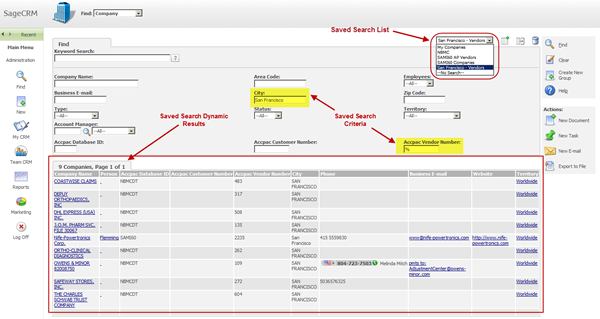
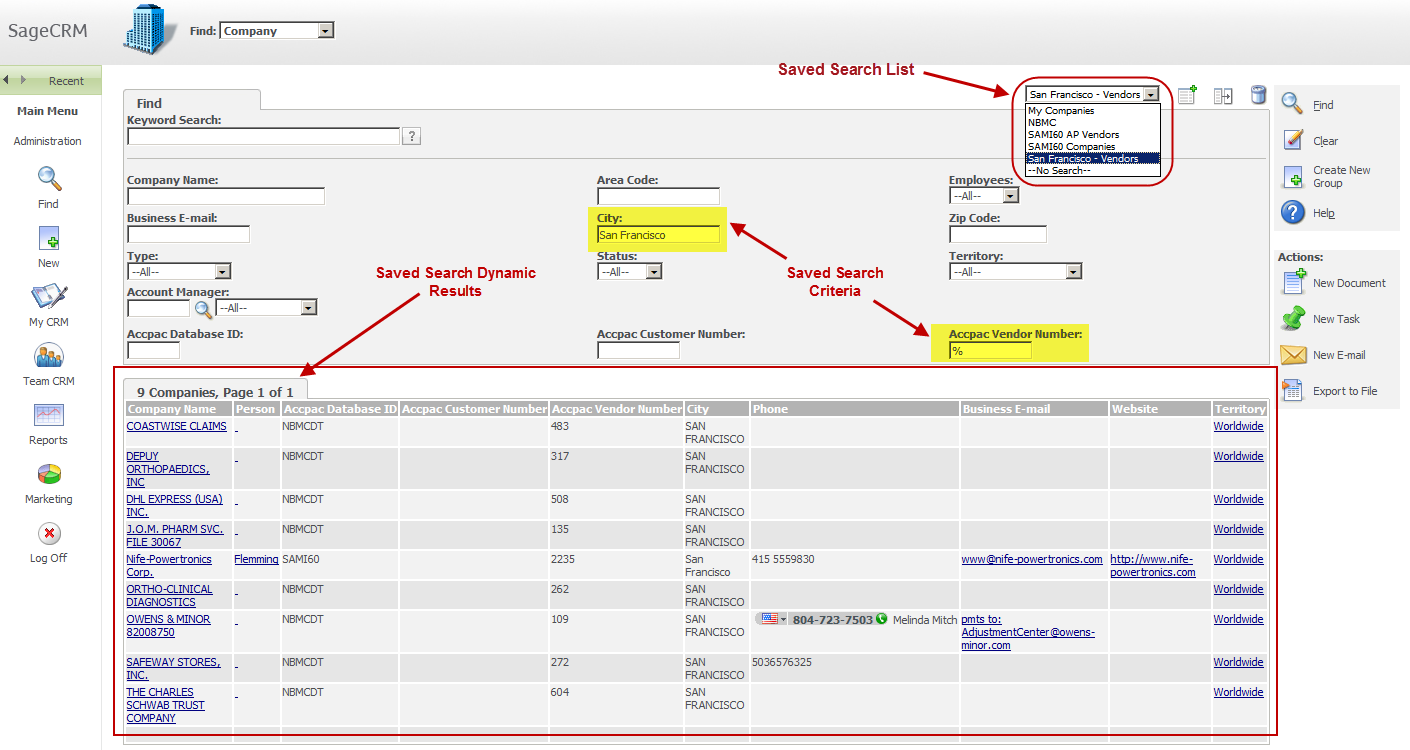
Saved Searches are a simple but powerful feature of [Sage CRM](https://www.equationtech.us/SageCRM/).  They can spare you the time and effort of manually keying in filtering criteria time and again when running your most frequently-used searches.  Here’s a look at using this time-saving feature in Sage CRM.
[![Sage CRM Saved Search](https://www.equationtech.us/hs-fs/file-14047847-png/images/09-05-2012-crm-save-search-thmb.png)](https://www.equationtech.us/hs-fs/file-14047898-png/images/09-05-2012-crm-save-search.png)

#### What Can I Save?

You can create a saved search against any of the main entities in Sage CRM including Companies, People, Opportunities, Orders, Quotes, Cases, Solutions, Leads, or Communications that match your search criteria.  There is no limit to the number of saved searches you can create and save.

In addition to creating your own customized lists, Sage CRM comes with a number of predefined saved searches that you may find useful. For example, the My Companies saved search available from the Find Company screen is set up to return a list of all of the companies assigned to you.

#### Saved Searches are Dynamic

Saved searches are dynamic which means they will always populate with the most up to date information each time you run the query.  For example, let’s say you want to search for all companies in Sage CRM that are located in San Franciscoand have 50 - 100 employees. When you create a Saved Search based on this list, you’re saving the search criteria as opposed to the actual list.  So when new companies are added to Sage CRM and meet the search criteria, the Saved Search is automatically updated.

Creating a New Saved Search

1. Click the Find menu button and select an entity (for example, Companies)
2. Select your required Search Criteria and click the Find button.  Your search results are displayed
3. Click the New Search button next to the Saved Search drop down box.
4. In the Saved Search details box that displays, type a name for your saved search.  For example: “San Francisco Companies – 50 to 100 Employees”

#### Using Your Saved Searches

Now that you’ve got your favorite and most frequently-used searches saved, you’ll also save a bunch of time performing common actions in Sage CRM like creating a mail merge to multiple recipients, sending email to a group of contacts, running reports, and more.  In addition, saved searches can be selected from the list of available content to display in your personal Sage CRM Interactive Dashboard.

Now that you know how, go ahead and start creating some of your favorite saved searches and be sure to [contact us](mailto://support@equationtech.us) if you need help.

### Related Articles

<https://www.equationtech.us/sage-accpac-blog/sage-membership>

##### [Sage Membership](https://www.equationtech.us/sage-accpac-blog/sage-membership)

Continuous learning is a key driver of high workplace engagement. The business benefits of having...

<https://www.equationtech.us/sage-accpac-blog/introducing-sage-data-analytics>

##### [Introducing Sage Data & Analytics](https://www.equationtech.us/sage-accpac-blog/introducing-sage-data-analytics)

Through a strategic partnership with Zap Data, Sage recently announced the launch of **Sage Data &...**

<https://www.equationtech.us/sage-accpac-blog/erp-vs-crm-what-is-the-difference>

##### [ERP vs CRM: What's the Difference?](https://www.equationtech.us/sage-accpac-blog/erp-vs-crm-what-is-the-difference)

If you’re reading this newsletter, you’re probably already familiar with what ERP does. But as a...

## Need Help Now?

[![Request a Call](https://hubspot-no-cache-na2-prod.s3.amazonaws.com/cta/default/41683/0d27fa16-1614-41b4-9caf-f9597d262c41.png)](https://hubspot-cta-redirect-na2-prod.s3.amazonaws.com/cta/redirect/41683/0d27fa16-1614-41b4-9caf-f9597d262c41)

Products We Support

- [Sage 300](https://www.equationtech.us/sage-services/sage-300)
- [Sage Intacct](https://www.equationtech.us/sage-services/sage-intacct/)
- [Sage CRM](https://www.equationtech.us/sage-services/sage-crm)
- [Sage HRMS](https://www.equationtech.us/sage-services/sage-hrms)
- [Sage FAS](https://www.equationtech.us/sage-services/fixed-assets)
- [Sage Intelligence](https://www.equationtech.us/sage-services/sage-intelligence)
- [Sage Enterprise Intelligence](https://www.equationtech.us/sage-services/sage-enterprise)
- [Sage Financials](https://www.equationtech.us/sage-services/sage-live)

Services We Offer

- [Software Selection & Licensing](https://www.equationtech.us/sage-services/erp-software-selection)
- [Implementation](https://www.equationtech.us/sage-services/erp-implementation)
- [Customization](https://www.equationtech.us/sage-services/customization)
- [Support](https://www.equationtech.us/sage-services/support)
- [Training](https://www.equationtech.us/sage-services/sage-training)
- [Hosting](https://www.equationtech.us/sage-services/hosting)
- [Upgrades](https://www.equationtech.us/sage-services/upgrades)

Resources

- [Technology Blog](https://www.equationtech.us/technology-blog)
- [Training](https://www.equationtech.us/sage-services/sage-training)
- [Sage Software Video Tutorials](https://www.equationtech.us/sage-300-erp-accpac-tutorial)
- [Case Studies](https://www.equationtech.us/case-studies)

About

- [Meet The Team](https://www.equationtech.us/management-team)
- [Certifications & Partners](https://www.equationtech.us/partners)
- [Careers](https://www.equationtech.us/careers)
- [Contact](https://www.equationtech.us/contact)
- [San Diego Location](https://www.equationtech.us/sage-300-support-san-diego)
- [Orange County Location](https://www.equationtech.us/sage-300-support-orange-county)
- [Seattle Location](https://www.equationtech.us/sage-300-support-seattle)

[![Equation Technologies - Sage 300 Authorized Partner](https://www.equationtech.us/hs-fs/hubfs/Redesign_Images/logo-footer.png?width=220&name=logo-footer.png "Equation Technologies - Sage 300 Authorized Partner")](https://www.equationtech.us/)

**Equation Technologies**

United States: 533 2nd Street Encinitas, CA 92024

Canada: #301 - 220 Brew Street Port Moody, BC V3H 0H6

Phone: 866.436.3530  •  E-mail: [info@equationtech.us](mailto:info@equationtech.us)

<https://www.linkedin.com/company/equation-technologies-inc-> <https://www.facebook.com/EquationTechnologies/> <https://twitter.com/Equation_Accpac> <https://plus.google.com/112496351654509577343>

Equation Technologies ©2016

[Contact Us](https://www.equationtech.us/contact)  | [Privacy Policy](https://www.equationtech.us/privacy-policy)

```json
{
  "@context" : "http://schema.org",
  "@type" : "Article",
  "author" : {
    "@type" : "Person",
    "name" : "EQ Tech"
  },
  "dateModified" : "Tue, Sep 4, 2012",
  "datePublished" : "Tue, Sep 4, 2012",
  "description" : "Sage 300 (formerly Sage Accpac) blog with informative articles in reference to financial software processes and procedures including payroll taxes, training, product information, custom development.",
  "headline" : "Working with Saved Searches in Sage CRM",
  "image" : {
    "@type" : "ImageObject",
    "height" : 800,
    "url" : "//cdn2.hubspot.net/hub/41683/file-14047847-png/images/09-05-2012-crm-save-search-thmb.png",
    "width" : 800
  },
  "mainEntityOfPage" : {
    "@id" : "https://www.equationtech.us/sage-accpac-blog/bid/89000/working-with-saved-searches-in-sage-crm",
    "@type" : "WebPage"
  },
  "publisher" : {
    "@type" : "Organization",
    "logo" : {
      "@type" : "ImageObject",
      "height" : 60,
      "url" : "https://www.equationtech.us/hs-fs/hubfs/Redesign_Images/logo.png?t=1474998725496&width=230&name=logo.png",
      "width" : 600
    },
    "name" : "Equation Technologies Inc."
  }
}
```