
This won’t be another Sage 300 vs Sage Intacct showdown over what product is superior, as it all depends on your business and goals. Instead, we want to be fully transparent and have an open and candid conversation about what kinds of third-party add-ons or Sage integrations are available for each platform and what’s built natively into the software. This way you can better decide which one is the best fit for you. So, let’s roll up our sleeves and get down to business.
If you’re new to the game, let’s review the basics for a second. According to Wikipedia, “a plug-in (also known as an add-on or an extension) is generally a third-party software component that adds a specific feature to an existing computer program. When a program supports plug-ins, it enables customization”.
So, you might be thinking that add-on solutions are a good thing. Well, yes and no. Third-party solutions indeed provide additional functionality meant to automate processes and streamline operations. With workflow automation alone saving companies anywhere from $10,000 to millions per year, it’s great that we can extend our software and give it more capabilities to better manage our business and save us money.
However, add-ons and integrated platforms often come with additional costs, like subscription costs, licenses, training costs, etc. They can also bring about challenges, like compatibility issues, increased complexity of the software environment, and security risks, with 80% of surveyed organizations last year experiencing at least one data breach caused by a third party. Understanding the pros and cons of integration is key to finding out what your comfort level is and what you’re willing to accept.
Now that we’ve got that out of the way. Let’s discuss what Sage integrations come with Sage Intacct. Here’s a brief overview of some built-in functionality included with Sage Intacct that Sage 300 users would need to purchase separately.
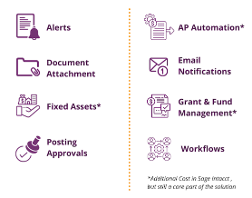 |
|
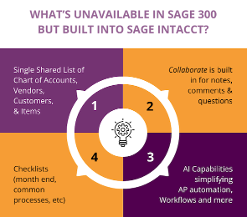
Other important built-in Sage Intacct functionality that we don’t want to miss out on mentioning include standardized checklists for month-end or common processes. These built-in checklists help keep workflows consistent across the organization ensuring efficiency and keeping everyone on the same productivity path.
Of course, a modern ERP system wouldn’t be modern without the integration of artificial intelligence (AI). It would be like calling a flip phone “cutting-edge”. Sage Intacct leverages AI to automate accounts payable processes, streamline workflow management, and various other functionalities needed to maintain day-to-day operations.
There’s also Sage Intacct Collaborate, which is all about boosting (yes, you guessed it!) collaboration amongst teams and helps speed up processes to improve overall organizational efficiency, all while keeping everyone on the same page in their day-to-day work.
Last, but definitely not least, there is the Sage Intacct Chart of Accounts. What’s unique about this feature is it helps businesses streamline their Chart of Account in a single shared list that is used across all vendors, customers, and items.
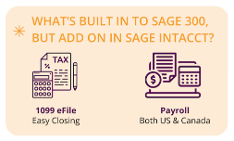
Although Sage 300 may lack the extensive list of built-in modules found in Sage Intacct, it still offers a few unique ones that are beneficial for managing key aspects of a business, such as:
 |
|
Keep in mind, though, that just because it’s not natively built into the Sage software doesn’t mean it’s not accessible. The conference TPAC is a whole event dedicated to learning and showcasing Development Partner Products that work with Sage 300.
Tax & Bank Support
Another noteworthy add-on that is not built into either Sage Intacct or Sage 300 that a lot of companies look to for help is tax assistance. If you need help with taxes, both Sage Intacct and Sage 300 clients must purchase a Tax Management add-on solution separately. We usually recommend Avalara, a well-known and commonly recommended Sage integration.
Sage Intacct takes the cake when it comes to its bank support which includes live bank feeds. Sage 300 clients can still get tax management help, but they must rely on imports for this feature.
Both Sage Intacct and Sage 300 accounting solutions both provide automation and the flexibility to manage the business the way you want to, whether that’s built-in or through third-party add-ons that enhance current system functionality. This is why we provide support and have many clients running on both platforms. It really depends on goals, comfort level, and of course, your budget, when choosing an ERP solution. If you need help deciding what works best for your business, contact us today to get a free assessment.